
Repair, Upgrade, Replace, or Build
Computer problems do not always have an obvious answer.
A slow computer may benefit from additional memory or faster storage, or it may be old enough that replacement makes more sense. A system that will not start could have a hardware failure, power issue, storage problem, or software-related fault.
Computer Ties helps customers evaluate the condition of the system and determine whether the better path is to:
- Repair the existing computer
- Upgrade selected components
- Replace an aging or unreliable system
- Build a desktop around specific performance requirements
The goal is to make a practical decision based on the system, its condition, the intended use, and the value of putting additional money into it.
Computer Repair
Computer Ties provides diagnostics, repair, and upgrade assistance for desktops and laptops experiencing hardware, performance, startup, or reliability problems.
Common Repair Needs Include
Computers that will not start
Slow or unreliable systems
Storage-drive problems
Memory upgrades
Hardware failures
Operating-system and software problems
Random shutdowns or crashes
General performance concerns
When possible, we will help you understand whether repairing the existing system is worthwhile before unnecessary money is invested in it.
Custom-Built Computers
A standard retail computer is not always the best fit.
Computer Ties builds custom desktop systems around the intended workload, performance requirements, available budget, and future needs.
Custom Systems May Be Appropriate For
Business workstations
Gaming PCs
CAD and design work
Higher-performance office applications
Specialized workloads
Systems requiring additional storage or expansion
The goal is not simply to build the most powerful computer possible. It is to build a system that makes sense for how it will actually be used.
Common Reasons Customers Contact Us
A Computer Has Become Slow or Unreliable
Performance problems can result from aging storage, limited memory, failing components, software issues, excessive startup activity, or the overall age of the system.
We can help determine whether the problem can reasonably be corrected or whether the computer is approaching the end of its useful life.
A Computer Will Not Start or Keeps Crashing
Boot failures, freezing, unexpected shutdowns, and repeated crashes can indicate hardware or software problems.
Proper diagnosis helps determine whether the system can be repaired and whether doing so is financially reasonable.
An Older Computer May Benefit From an Upgrade
Some systems can gain useful additional life from targeted upgrades such as additional memory or faster storage.
Others may be too old to justify further investment.
A Retail Computer Does Not Fit the Workload
Some users need more processing power, graphics performance, storage capacity, cooling, expandability, or other capabilities than a typical retail computer provides.
A custom desktop allows the system to be designed around those requirements.
Repair or Replacement Is Not an Obvious Decision
Sometimes the most useful service is determining that a computer is no longer worth repairing.
Computer Ties can help evaluate the problem and provide practical repair-versus-replacement guidance.
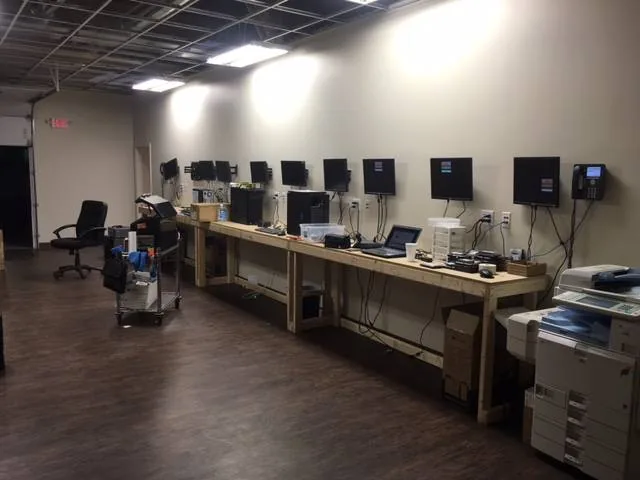
Support for Businesses and Home Users
Computer Ties provides repair and custom-system services for both organizations and individual customers.
Business customers may need workstation diagnostics, component replacement, performance improvements, hardware upgrades, replacement planning, or specialized desktops for particular job roles.
Home users may need assistance with slow or damaged computers, hardware failures, upgrades, gaming systems, or general repair questions.
For organizations that need ongoing management of multiple users and devices rather than an individual repair, Managed IT Services may be a better fit.
Custom Systems & Repair vs. Managed IT Services
Custom Systems & Repair focuses on individual computers, hardware problems, upgrades, diagnostics, and custom desktop systems.
Managed IT Services are designed for businesses and organizations that need an ongoing support structure around users, devices, maintenance, patching, backups, documentation, security services, and technology planning.
A business can use Computer Ties for an individual repair without becoming a Managed IT customer.
How Repair Service Usually Starts
Step 1: Explain the Problem
Tell us what the computer is doing, when the problem started, and whether there are any error messages or other noticeable symptoms.
You do not need to diagnose the problem yourself.
Step 2: Diagnose the System
Computer Ties evaluates the reported problem and determines what appears to be causing it.
Depending on the issue, additional troubleshooting or testing may be required before a repair recommendation can be made.
Step 3: Review the Practical Next Step
Once the problem is understood, the next step may be repair, a targeted hardware upgrade, replacement, data-related work, or another appropriate service.
If repairing the computer does not make practical sense, we will tell you.
Frequently Asked Questions
Computer Ties provides diagnostic and repair assistance for desktop and laptop computers experiencing hardware, startup, performance, reliability, or software-related problems.
Specific repair options depend on the system, its age, available parts, and the nature of the problem.
That depends on the age of the system, the problem, the expected repair cost, available replacement options, and how the computer is being used.
Computer Ties can help evaluate whether repair, upgrade, or replacement provides the better practical value.
In many cases, yes.
Depending on the system, upgrades such as additional memory, faster storage, or selected component replacements may improve performance or extend its useful life.
Not every older computer is a good candidate for an upgrade, so the system should be evaluated first.
Computer Ties builds custom desktop systems for business use, gaming, CAD and design work, high-performance applications, and other workloads that benefit from more deliberate component selection.
Generally, no.
Laptop components and chassis are much more manufacturer-specific than desktop systems, which makes true custom laptop builds impractical in most situations.
Computer Ties can still help evaluate or recommend laptop replacement options when appropriate.
Yes.
Computer Ties can build gaming desktops around the desired performance level, display resolution, games being played, storage needs, upgrade goals, and available budget.
Yes.
Custom workstations can be configured around CAD, design, engineering, or other applications that may benefit from specific processor, graphics, memory, or storage capabilities.
The correct configuration depends on the applications and workload involved.
Data-transfer options depend on the condition of the old system and storage device.
If the data is accessible, Computer Ties can discuss appropriate transfer options as part of the repair or replacement process.

Need Computer Repair or a Better-Fit System?
If your computer is failing, running poorly, or no longer meeting your needs, Computer Ties can help determine whether repair, upgrade, replacement, or a custom-built desktop makes the most sense.